

Hugo Huang
21 July 2023
Start your SEV VMs on Google Cloud
SEV is a new security feature that is available on AMD’s EPYC processors. It stands for Secure Encrypted Virtualization Secure Nested Pages. SEV provides a new level of protection for firmware by encrypting the memory pages that contain the firmware code. This makes it much more difficult for attackers to gain access to the firmware and launch attacks.
The benefit of SEV
With SEV embedded firmware in your VMs, you will enjoy improved security, increased isolation, enhanced performance for your VMs.
- Improved security. SEV encrypts the memory pages that contain firmware code. This makes it much more difficult for attackers to gain access to the firmware and launch attacks.
- Increased isolation. SEV allows each VM to have its own secure memory space. This means that a VM cannot access the memory of another VM, even if the hypervisor is compromised.
- Enhanced performance. SEV can be used to improve the performance of virtualized applications. This is because SEV allows the hypervisor to offload some of the security processing to the processor.
The relationship between SEV and Confidential Computing
Confidential Computing is the protection of data in-use with hardware-based Trusted Execution Environment (TEE). TEEs are secure and isolated environments that prevent unauthorized access or modification of applications and data while they are in use. This security standard is defined by the Confidential Computing Consortium. The end-to-end encryption is comprised of three states.
- Encryption-at-rest protects your data while it is being stored.
- Encryption-in-transit protects your data when it is moving between two points.
- Encryption-in-use protects your data while it is being processed.
Confidential Computing provides the last piece of end-to-end encryption: encryption-in-use.
SEV provides an extra layer of safeguard against malicious hypervisor-based attacks, such as data reply and memory re-mapping. These protections establish a secure and isolated execution environment, bolstering overall security.
Furthermore, SEV introduces several optional security enhancements tailored to support various VM use models. It also strengthens protection around interrupt behavior and bolsters defenses against recently discovered side channel attacks.
How to start a SEV VM (Private Preview) on Google Cloud
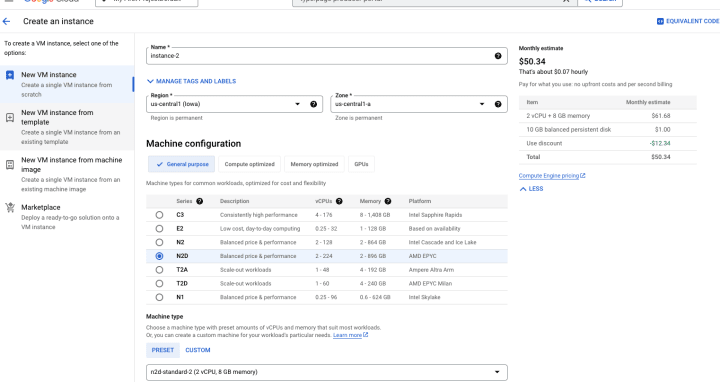
In Google Cloud Console, choose Compute Engine and Create an Instance. Make sure you select N2D machine (AMD EPYC).
- On Aug 31st, 2023, SEV is still in Private Preview on Google Cloud.
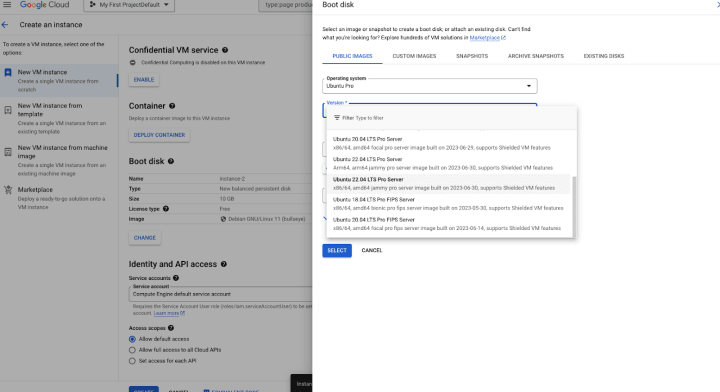
Under Boot disk, select a SEV compatible Operating System, such as Ubuntu 22.04 LTS Pro Server (x86/64, amd64 jammy pro server).
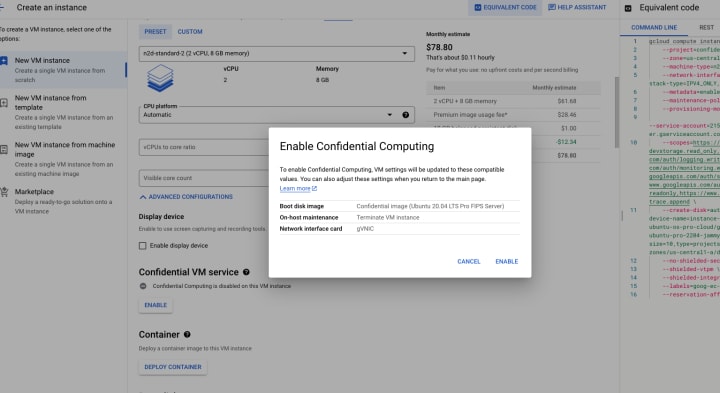
Make sure enable Confidential VM service
Click CREATE. Enjoy your SEV VM!


